What is Login Activity?
Written By Sara Irfan
Last updated 4 months ago
Login Activity is a behavioral analytics feature that tracks how your sub-accounts and their users engage with your SaaS platform. It gives you visibility into:
Who is logging in (users and sub-accounts)
When they're logging in (timestamps, frequency, patterns)
How long they're spending in the app (session duration, time spent)
What users do during their logged-in time
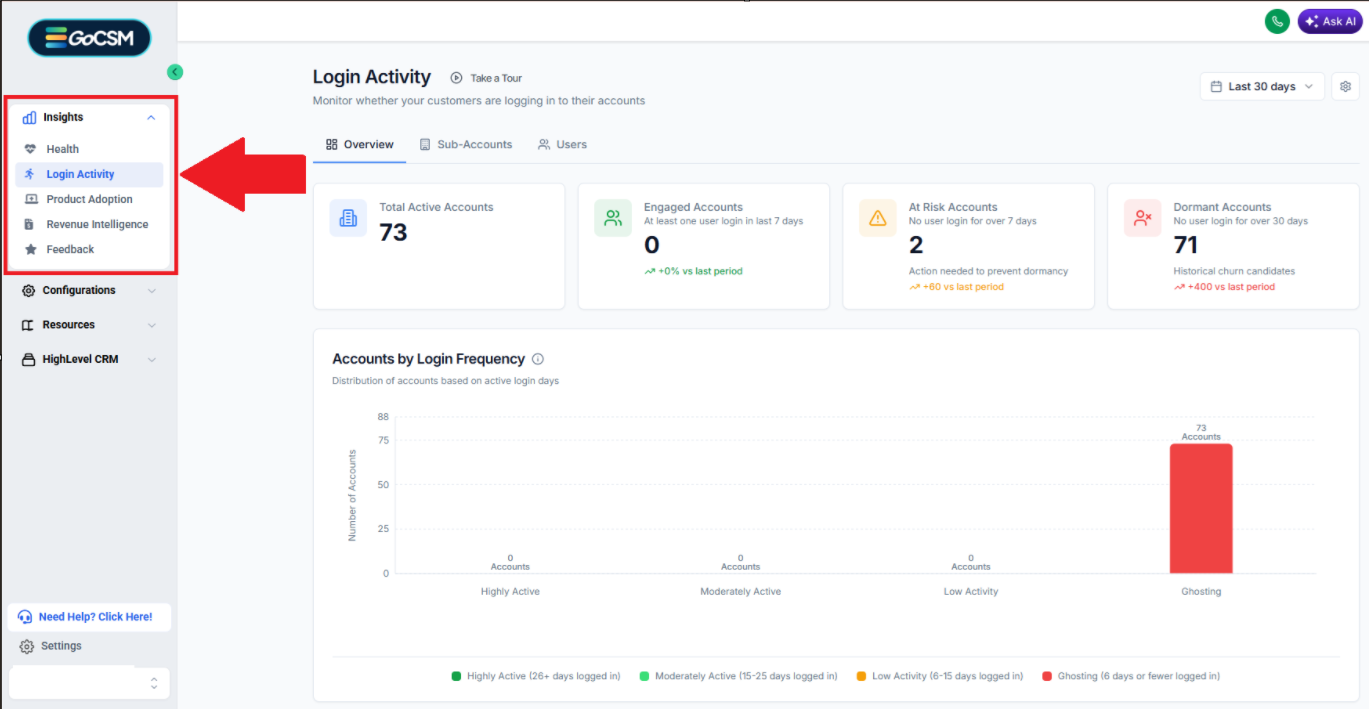
Why It Exists
As a GHL SaaS agency owner, you're running a software business. Login Activity helps you:
Identify at-risk accounts before they churn
Spot power users and understand what drives engagement
Monitor adoption of new sub-accounts after onboarding
Measure the impact of training, onboarding, or product changes
Prioritize support based on actual engagement, not just revenue
What Problems It Solves
For Customer Success Teams:
"Which accounts haven't logged in for 2 weeks?" → Proactive outreach
"Is this new sub-account actually using the platform?" → Onboarding validation
"Which users are power users we can interview?" → Customer insights
For Sales:
"Show me accounts that are heavily engaged but on lower-tier plans" → Upsell opportunities
"Which accounts are ghosting?" → Risk mitigation
Who Should Use Login Activity
CSMs: Weekly check-ins, QBRs, health score monitoring
Sales: Renewal risk assessment, upsell identification
Leadership: High-level engagement dashboards
Known Limitations & Edge Cases
Delayed Events (2-3 minutes)
Data is not real-time. Events are batched and buffered for performance. Typical delay is 30 seconds to 2 minutes from the user opening the app. If a customer says "I just logged in but don't see it," tell them to wait 2-3 minutes and refresh. This is expected behavior.
Mobile App
Native mobile apps (iOS/Android) are NOT tracked for login activity. GoCSM tracks feature adoption and revenue intelligence through the mobile app, but login activity specifically relies on browser-based login events.
Historical Data Limits (180 days)
Data is retained for a maximum of 6 months. "Last Year" or "Year-to-Date" options are NOT available if they exceed this window.
Bot Traffic Inflation
Automated testing tools (Selenium, Puppeteer) that load the web UI may inflate login counts. Look for suspiciously regular patterns or 24/7 activity. Workaround: Exclude specific user IDs from tracking.
No Device/Browser Breakdown
We do NOT track device type, browser, operating system, or User-Agent. This is a deliberate privacy-first design decision.
Session Refresh Behavior
If a user keeps a tab open for hours but doesn't interact, we do NOT count it as "active time." Tracking stops when the tab is hidden or idle for 5 minutes.
Data Privacy
What Data Does Login Activity Collect?
Login Activity tracks behavioral events only. We do NOT track personally identifiable network or device information.
What We Track
User ID
Company ID
Location/Sub-
AccountIDLogin Timestamp
Duration/Time Spent in HighLevel
What We Don't Track
Privacy-First Design:
❌ IP Address — Not collected
❌ User-Agent / Browser details — Not collected
❌ Device type (mobile, desktop, tablet) — Not collected
❌ Geolocation (country, city, region) — Not collected
❌ Screen resolution — Not collected
❌ Operating system — Not collected
❌ Browser fingerprints — Not collected
We focus exclusively on what users do (behavioral analytics), not who they are or where they are (identity or network tracking). This reduces privacy concerns and simplifies GDPR/CCPA compliance.
What Counts as a "Login"
A login is considered anytime the user opened the web app and navigated to their account. We don't distinguish between an initial login and a returning session.
Data Retention
We retain data for a maximum of 180 days (6 months). Historical data older than 6 months is automatically purged.
Time Zone Handling
All timestamps are stored in UTC and displayed in your browser's local time zone. "Today" means today in your browser's time zone, not UTC.
Common Questions & Answers
Can I see IP addresses or device types for logins?
No. We focus exclusively on behavioral analytics without collecting personally identifiable network or device information. For IP addresses or device info for security purposes, check your authentication provider's logs.
Was this helpful?
Still need help? Ask the team